How it works

A fast walkthrough from activity data to reporting.

Karvoix helps teams move from recorded activity data to calculation, review, and reporting in one structured workflow that is easier to follow and easier to review than spreadsheet-led reporting.

This walkthrough is meant to help you compare your current reporting process with a more structured workflow.

The workflow in plain language

This stays intentionally practical and human-readable so visitors can understand the workflow quickly without logging in.

Flow summary

From activity data to reporting in one reviewable workflow

Activity data flows into factor-backed calculation, then into review and reporting, without forcing teams to rebuild the logic across disconnected sheets each cycle.

Instead of rebuilding logic across spreadsheets each cycle, the workflow stays connected from input to reporting.

Step 1

Capture activity data in a structured workspace

Add activity data such as fuel usage, electricity, or logistics records into one workspace instead of collecting them across disconnected sheets and file versions.

Instead of collecting files across teams before review begins.

  • Choose the facility or reporting context where the record belongs
  • Capture or import the activity behind the number
  • Start from one structured dataset instead of scattered spreadsheets
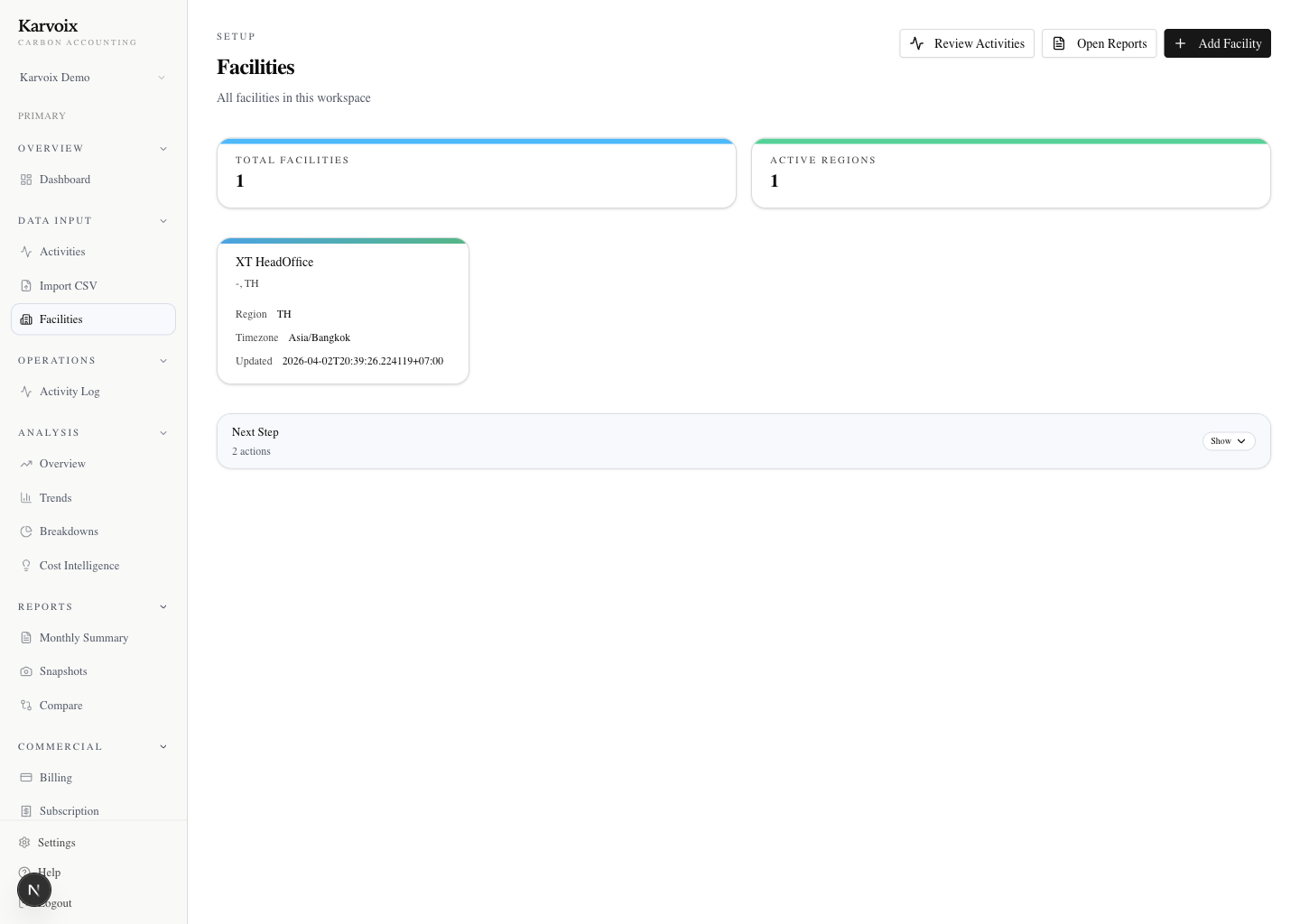
Karvoix facility list showing available operational facilities.
Step 2

Apply factor-backed calculations with the basis visible

Karvoix applies factor-backed calculations to recorded fuel, electricity, or logistics activity using region-appropriate logic where applicable, keeping the basis visible instead of burying it in formulas and side notes.

Instead of decoding formulas and assumptions after the fact.

  • Turn recorded activity into carbon calculations with less manual rebuilding
  • Keep factor-backed basis close to the result
  • Review the number more easily than rebuilding spreadsheet formulas
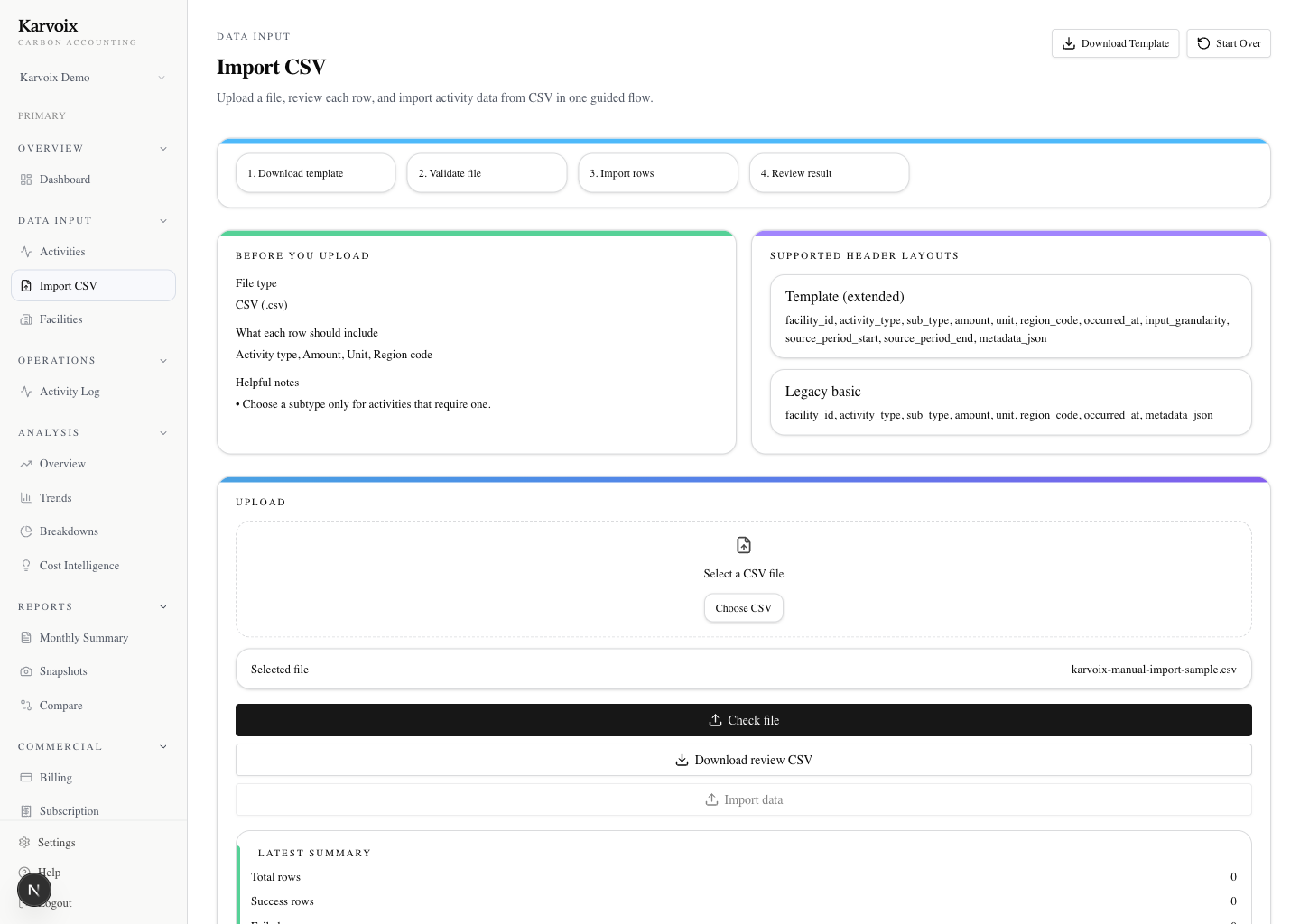
Karvoix import screen showing CSV import setup for activity data.
Step 3

Review totals, contributors, and changes in one flow

Review headline totals, contributors, and movement over time for fuel, electricity, or logistics categories from the same product flow instead of reconciling versions manually before every internal discussion.

Instead of reconciling different versions across teams.

  • See what changed and where deeper review is needed
  • Inspect contributors without leaving the workflow
  • Reduce back-and-forth between finance, operations, and sustainability
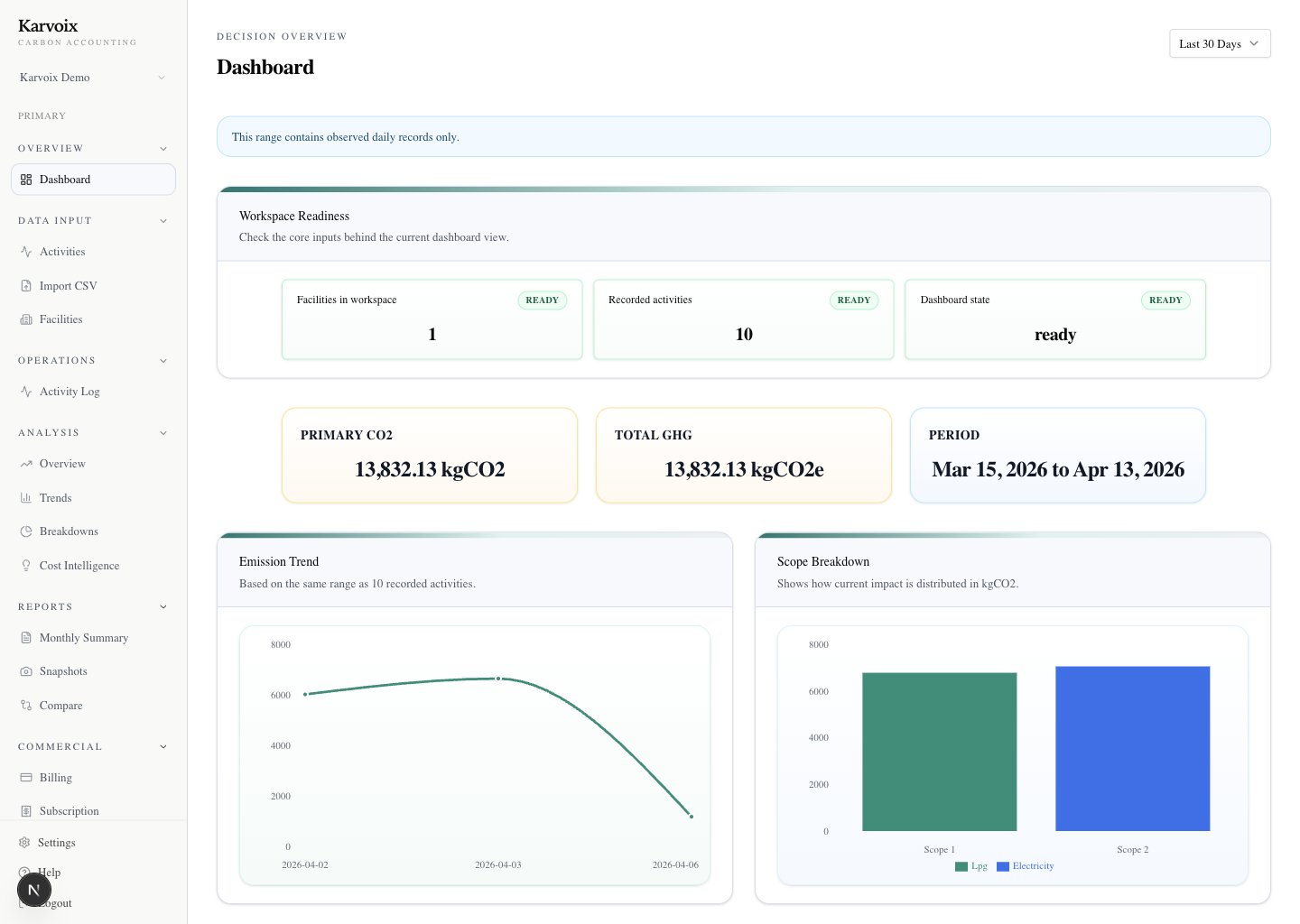
Karvoix dashboard overview showing current emissions visibility.
Step 4

Generate reports from the reviewed workflow

Create monthly reporting views and snapshots from the same structured flow, so outputs stay tied to the activity and review logic that produced them instead of being rebuilt each cycle.

Instead of rebuilding outputs every reporting cycle.

  • Generate repeatable reports from reviewed data
  • Keep outputs connected to source activity and calculation context
  • Make recurring reporting easier than manual export-and-reconcile workflows
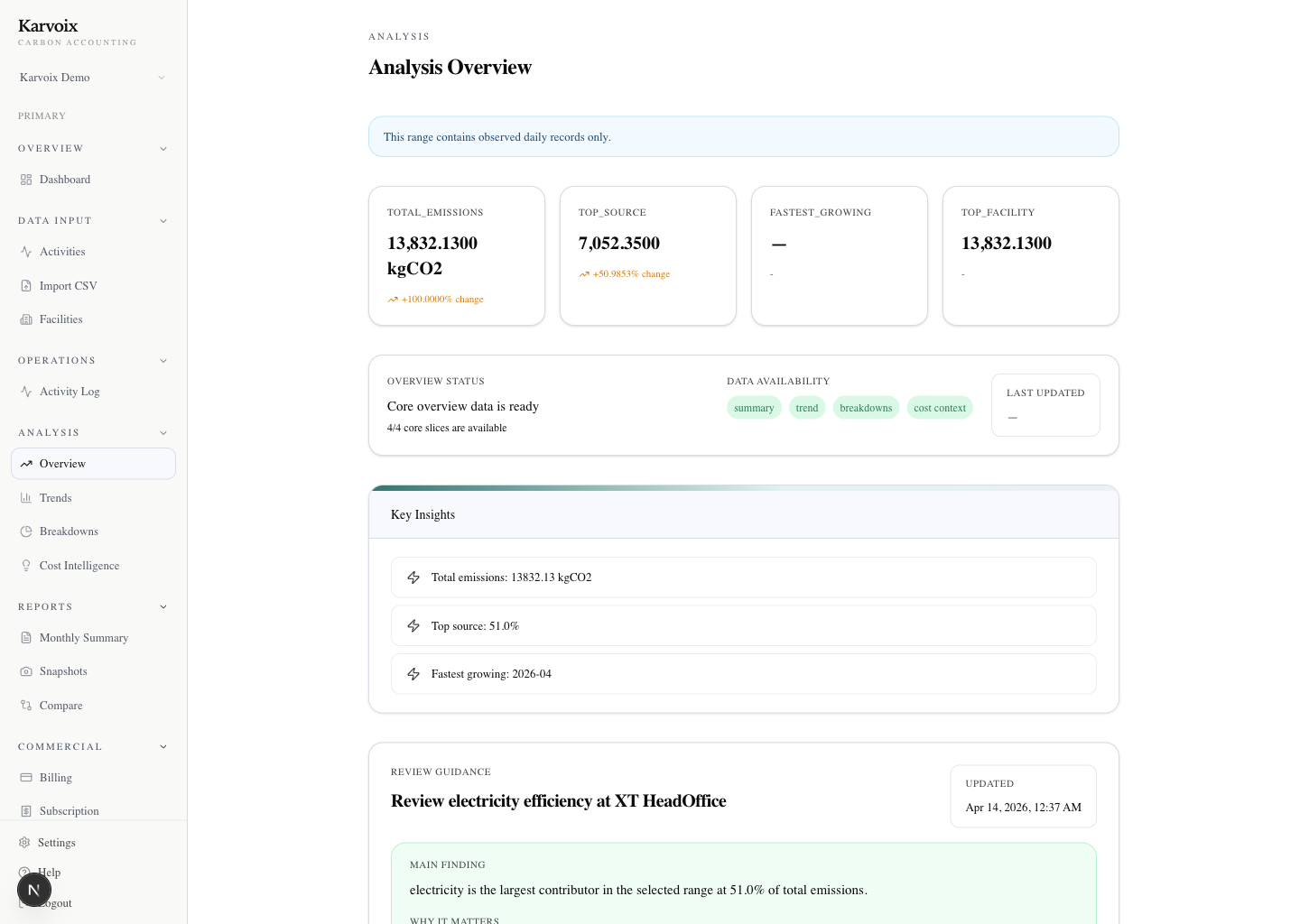
Karvoix analysis overview showing emissions drivers and trends.

Walk through your current reporting flow with Karvoix

We use a 30 to 45 minute working session to walk through your current reporting flow, where spreadsheet-based review slows teams down, and how this workflow would fit in practice.

This is typically where teams see whether the workflow actually reduces review friction.

No preparation needed. Bring your current process or questions — we’ll walk through it together.

API-focused flow

The phase-1 integration path the backend actually supports today

For teams evaluating more than a dashboard, this flow shows how the current integration baseline compares to spreadsheet-led reporting and where developers can start with a believable scope right now.

01

Send activity data

Submit activity through the calculate API or CSV baseline with the facility context the record belongs to.

02

Karvoix calculates and stores truth

The backend calculates and persists carbon truth in one system rather than returning an isolated number with no history.

03

Read activity back

Read submitted activity back so internal systems and reporting flows can work from the same stored record.

04

Inspect historical ledger trace

Use ledger trace to inspect historical context and understand how the result was formed later on.

Current phase-1 baseline

This baseline includes activity submission, facility support, activity readback, ledger trace, CSV validate/import baseline, and credential surfaces for API keys, service accounts, and webhooks.

Quickstart, API reference, and developer surfaces are shared during controlled pilot onboarding.

Not part of the current public subset

  • full dashboard API
  • analysis API
  • monitoring API
  • factor governance API
  • async bulk ingestion
  • full developer platform

Quickstart, API reference, and developer surfaces are shared during controlled pilot onboarding.

Workflow gallery

Screens that make the operating flow concrete

This set connects facility setup, data import, dashboard review, and analysis so visitors can understand the operating path before entering the product app.

These screens show what teams actually review, not just what gets reported.

Karvoix facility list showing available operational facilities.

Step 01

Choose the operational context

Facilities give the workflow a clear place to start before records, calculations, and review surfaces build on top.

So teams know where the number comes from before reviewing it.

Karvoix import screen showing CSV import setup for activity data.

Step 02

Bring activity data in cleanly

Manual entry and CSV import both support getting real activity into the system instead of re-keying everything later.

So data is structured early instead of reconstructed later.

Karvoix dashboard overview showing current emissions visibility.

Step 03

Review the current picture

The dashboard turns recorded activity into an immediate summary of totals, signals, and what deserves attention next.

So reviewers see movement without rebuilding context.

Karvoix analysis overview showing emissions drivers and trends.

Step 04

Go deeper into drivers and changes

Analysis surfaces add the breakdowns and trend context needed for serious review conversations.

So analysis happens without leaving the workflow.

What visitors should expect

The public site introduces the workflow. The separate product app handles runtime work.

That split keeps this repo focused on understanding, trust, and conversion while leaving authenticated product logic inside karvoix-web.

The goal is to understand the workflow before committing to the product.

What this site does

Explain product value, workflow, trust posture, and how visitors can continue into the product app.

What this site does not do

It does not include dashboard runtime logic, authenticated flows, or product-shell behavior copied from the app.

Getting started

How to try Karvoix

This is the shortest path from the marketing site to your first real product workflow.

This path is intentionally simple so teams can move from understanding to real workflow quickly.

01

Open the marketing site

Start here to understand what Karvoix does, who it is for, and how the product workflow is structured.

02

Click "Get Started"

Use the primary CTA to continue from the public site into the separate product application entry point.

03

Sign in to the product app

Authentication and runtime product workflows stay in the product app rather than on the marketing site.

04

Add your first activity or import data

Once inside the app, create or select a facility, then start with manual activity entry or CSV import so results can be reviewed across dashboard, analysis, and reports.

Next step

See how this workflow maps to the way your team already works

Bring your current process, reporting questions, or first activity data examples. We will walk through the workflow together and show where it reduces spreadsheet-driven review friction.

Use this session to decide whether this workflow fits how your team already works.

No preparation needed. Bring your current process or questions — we’ll walk through it together.